

I was going to wait and do this tutorial until I could get my hands on all of the Dollar Tree’s new Cricut products, but I saw so many people confused (as was I) and I wanted to help you guys out!
First off, if you don’t know what I am talking about, Dollar Tree has launched a whole bunch of new crafting supplies including vinyl tools, vinyl, transfer tape, faux leather, etc. You can see the haul I found on Instagram. So far, I’ve been quite impressed with the items I have used. The transfer tape is amazing! I don’t see any reason why it won’t be my go-to for now on; but today, let’s talk about the glitter vinyl!

Cutting
To cut the vinyl on the Cricut, you are going to want to create a custom setting. If you are doing a large shape, you might be able to get away with the vinyl setting but for anything even a little intricate I suggest changing the pressure to 145. If you don’t know how to do that, here is a short tutorial.
What can I use the vinyl for?
I’ll be honest, this is not the best vinyl in the world. Even though it says permanent, I know my two-year-old could tear this off on the first try. That being said, I still think it has a place in my craft stash! First off, this would be great vinyl for paper projects. I like to use vinyl while scrapbooking to give a different dimension and make it so I don’t have to line everything up perfectly. It was also work great for a stencil or for a project that will be sealed with epoxy.
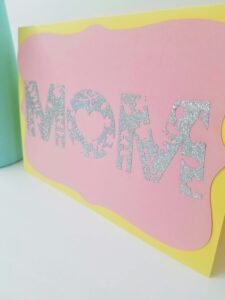
If you do want to use this vinyl for a more ‘typical’ project, keep the images large and insure it is a project that won’t get much wear and tear. That being said, it does stick. I have rubbed my hand back and forth on my little cup and the vinyl is not budging. Once you have the right setting, this vinyl is fun to use!
So, what are your thoughts? Will you be buying the Dollar Tree vinyl or other new craft items? Let me know in the comments! Happy craftin!


It certainly makes things more affordable for the bargain hunter!
Indeed! It’s not the best product out there, but for the price it does the job!
You Really SAVED ME!!! I thought I had to go and spend a bunch on glitter vinyl and I am so relieved to know there is a better more affordable option! Thanks for the Video!
Glad to help! 🙂
Okay I have a comment when I cut the vinyl I can’t get the letters off of the sticky paper so when I put it on something the white backing and the letters I’ll go on together so how do you cut it and get the letters or item that you’re making off of the paper by itself?
Great question. I hope I can answer it. So, for letters with the super cheap vinyl, I put it on transfer tape before weeding. So cut the whole thing and then stick the entire image to the transfer tape. Then, put the transfer tape face down on your table and pull the white paper backing off. Then you can get rid of all the vinyl parts you don’t need. I hope that helps!
YAY! I’m glad it was helpful!
OMG Thank you so much i bought so much of this and it ripped to shreds everytime i tried to cut it! i tried the washi setting the vinyl setting the paper setting and watched so many videos and never did anybody say anything about changing the pressure setting!! Thank you so much
Glad to help! I hope it worked out for you!
Thank you, Thank you, Thank you!! I learned something new and now I am ready to get my projects done!
Yay! Happy craftin’!
Hi,
Your directions to personalize the glitter setting was great. However, i did all the steps. I changed the setting to 145. However, it didn’t cut. What am I doing wrong?
I am using the green mat.
The dial on is on custom. Im using the personalize option. Can you please help? It not ripping anymore, but it is not cutting either.
Are you using glitter vinyl or the regular? I have yet to get my hands on the regular, but I’ve heard it requires a little more pressure. You can try changing to 150 and see if that works. You also might want to replace your blade or mat. I hope that helps!
Thank you so much! I just got a Cricut a week ago so I prefer some cheaper options to learn. My first attempt didn’t go well until I saw this. Thank you so much!
Welcome to the Cricut Family! I’m glad you got it to work for you!
Hello, thank you for this! But I tried all steps and when I get to the point of looking up the added material, it doesn’t find it. 🙁 Have any idea why?
Make sure you are searching it exactly how you typed it in. Cricut Design Space isn’t very good at searching. An easier way is to go to the ‘My Materials’ category. You can scroll through all the materials to find it or use the drop down at the top. Hope this helps! If you still can’t find it, you might have forgotten to actually click save (it happens) so you may need to create the material again. Good luck!
Your video on how to add Dollar Tree glitter vinyl paper was a lifer saver. Thank you! Now I know how to change the pressure setting on some other off brand vinyls I have that don’t seem to cut well. And putting the transfer paper on before weeding was also a big help. Instead of using the Cricut transfer paper, I just buy the clear contact paper from the Dollar Tree, There’s more in one roll and I am able to use it more than one time to apply my projects. 🙂
I’m so glad it was helpful! Dollar Tree for the win! Thanks for stopping by and for your sweet comment.
I love this stuff! When it first came out, it was nearly unusable (nearly!) Now they seem to have made it thicker and perhaps stickier. I found that using Cricut brand transfer tape (Target has a great price for it. Forget JoAnn for this!) is best. I tried Dollar Tree tape and Hobby Lobby tape for putting the vinyl on foam-core board and Cricut did not wreck my surface.
I made a TON of signs for a show my club put on. After I was done I counted the empty boxes in my trash. There were 15! Imagine how much that would be, even with an off-brand, and WHOA with Cricut brand!
Thank you for sharing! I’ll be honest, I haven’t purchased any after my initial batch, but I’m glad to hear it is better! Maybe I will have to give it another go!
I did it all – still shredding on my end
I’m sorry. I’ve heard the product has changed some, but I personally have not purchased it since writing this post. It really does not do well for anything remotely intricate. Best of luck.
Very insightful, and informative information found here. Well done 😊
This worked perfectly for me on both the glitter and glossy vinyl papers! At regular pressure it cut through both the vinyl and backing on the glitter but did more of a kiss cut sticker style cut (only through the vinyl, not the backing) on the glossy. Thank you so much for figuring this out and sharing it!
I’m glad it worked for you! Thanks for the feedback and happy craftin’!
This is a game changer! Thank you 🙂
Thank you for this information. Was trying to print something for the front of a Journal I am putting together and I used the aluminum foil selection with less pressure, but it didn’t cut through so I just let it cut twice but it started ripping. I am fixing to try your recommendations and I am confident everything will be fine. Thank you that’s very kind of you to make this post. You’re correct never saw that at the bottom of the material list lol.
Thanks for your comment, Tori! I hope your project went well. 🙂